In a profile editor, it is surprisingly easy to trigger avatar processing more than once. A second pass can quietly shrink the canvas, soften edges, or shift compression artifacts—even when the user only updated their display name. To prevent cumulative drift, treat the original upload and every derived image as distinct, immutable assets.
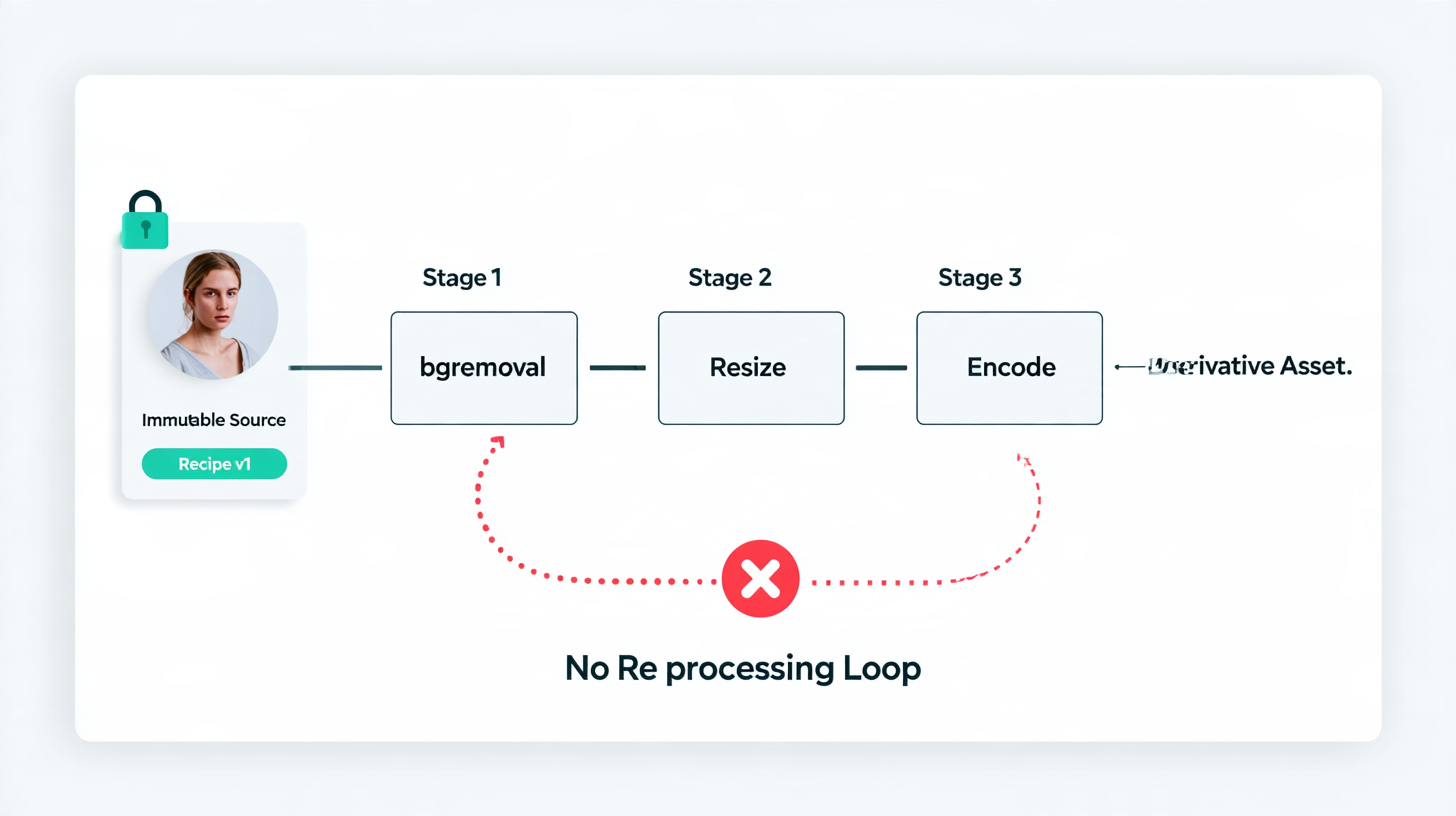
Use the Source as the Stable Input
Always anchor processing on the original uploaded source rather than a previously generated image. Store an immutable source identifier alongside a processing recipe version (such as crop dimensions, padding, or format rules).
- Reuse on match: When both the source ID and recipe version match an existing derivative, return or reuse that asset instead of re-running the pipeline.
- Never loop derivatives back in: Do not feed an already-processed thumbnail or resized image back into subsequent pipeline runs.
Isolate each stage so changes stay traceable. For example, bgremoval is just one stage in the pipeline—keep its intermediate output separate from resizing and final encoding. If visual quality or dimensions change later, you can pinpoint which stage introduced the difference.
Test the Retry Path
External image processing services fail or time out in ways that leave partial state behind. Simulate a timeout after the remote worker finishes processing, but before your application records success.
A retry should resolve to the same logical asset rather than spawning a chain of slightly altered copies. While the MDN reference on HTTP request methods explains idempotency at the protocol level, your application still needs its own job identity, state tracking, and deduplication logic around external processing calls.
Keep Replacement Explicit
Avatar replacement should be an intentional state transition, not an accidental side effect of saving unrelated profile fields:
- Create a new version on new upload: When a user uploads a new source image, create a new asset version rather than overwriting the existing one in place.
- Switch references after validation: Only point the user profile to the new avatar asset once processing and validation succeed.
- Keep enough metadata to explain lineage: Retain source IDs, recipe versions, and stage metadata so you can audit what produced an image, while setting clear retention or cleanup policies so obsolete uploads do not accumulate forever.
Include Recipe Changes in Your Test Suite
Your tests should verify both sides of idempotency:
- Ordinary retry: Re-running the same job with the same source and recipe resolves to the existing derivative.
- Recipe change: Updating a rule—such as a new crop ratio or margin—deliberately produces a fresh derivative without touching older assets.
The goal is predictable behavior: changing a biography or display name should never quietly edit the person's face.
Comments
Join the discussionNo comments yet. Be the first to comment.